Give free rein to your creativity with Movavi Video Editor Plus 2020! Its intuitive controls help you start editing right away: cut and join clips, add special effects and titles, then upload the results to YouTube right from the program. Video editing with Movavi is fast, simple, and fun.

Daftar masuk untuk menambah item ini ke senarai hajat anda, ikuti atau tandakannya sebagai diabaikan

Lihat keseluruhan koleksi Movavi Software di Steam
Bahasa Bahasa Melayu tidak disokong

Produk ini tidak menyokong bahasa tempatan anda. Sila semak senarai bahasa yang disokong di bawah sebelum membuat pembelian

Notis: Movavi Video Editor Plus 2020 - Video Editing Software tidak tersedia di gedung Steam lagi.
 

Tentang Perisian Ini

Movavi Video Editor Plus 2020

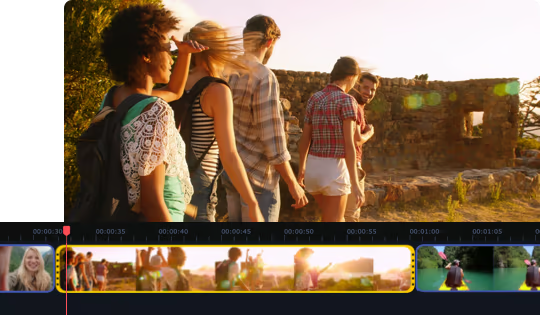
has everything you need to bring your ideas to life: edit your footage on a handy multi-track timeline, apply special effects, tweak the audio, and save results in any format or upload directly to YouTube. You’ll have a complete movie in under 20 minutes!


Highlights

  • The smooth dark interface with perfectly positioned buttons and tabs makes video editing more intuitive.
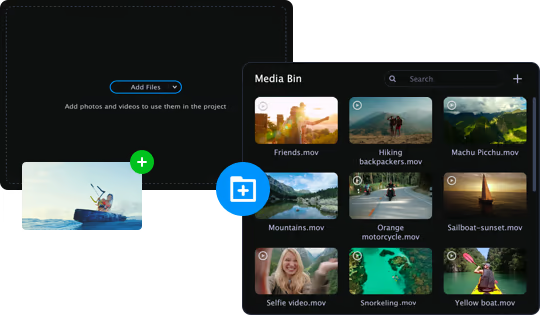
  • Quickly access any file you upload to the program via the new Media Bin so you can easily manage video and audio elements even in large projects.


  • Filmstrip view makes it easier to cut footage and apply effects to specific frames.
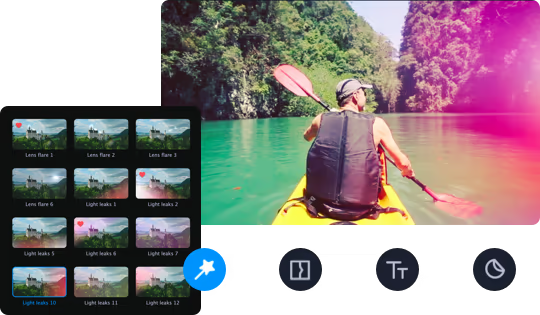
  • Even more effects! Glitch and retro filters, captivating Parallax transitions – you need to check these puppies out.

True creative freedom

Want to get creative? Movavi has just the right tools:

  • Stylish filters and transitions, themed stickers and titles


  • Special effects: Chroma Key, Slow Motion, Object Animation, Picture in Picture, Pan & Zoom, and more
  • Volume normalization, noise removal, equalizer, audio recording
  • Adjusting clip properties: cutting, cropping, rotating

You can make movies automatically, too. Just upload the files in Quick Video mode and the program will do the rest.

The perfect support for creative flow

You don’t need to struggle through complex professional software to get professional-grade results. Movavi Video Editor Plus 2020 is the perfect combination of simplicity and functionality:

  • The handy Media Bin helps you organize files for your project
  • Effortless control over up to 99 tracks on the timeline


  • Smooth 4K editing thanks to Fast Track HD technology
  • Intuitive navigation between tabs and menus

A smooth journey from concept to reality

Save the results on your computer or upload them directly to YouTube, Vimeo, or Google Drive so that everyone can see them right away.


Keperluan Sistem

Windows
macOS
    Minimum:
    • Memerlukan pemproses 64-bit dan sistem pengendalian
    • OS *: Microsoft® Windows® 7/8/10 with up-to-date patches and service packs installed
    • Pemproses: Intel®, AMD®, or compatible processor, 1.5 GHz
    • Memori: 2 GB RAM
    • Grafik: Intel® HD Graphics 2000, NVIDIA® GeForce® series 8 and 8M, Quadro FX 4800, Quadro FX 5600, AMD Radeon™ R600, Mobility Radeon™ HD 4330, Mobility FirePro™ series, Radeon™ R5 M230 or higher graphics card with up-to-date drivers
    • Storan: 800 MB ruang tersedia
    Dicadangkan:
    • Memerlukan pemproses 64-bit dan sistem pengendalian
* Mulai 1 Januari 2024, Steam Client hanya akan menyokong Windows 10 dan versi yang lebih baharu.
    Minimum:
    • OS: Mac OS X® 10.10 or higher
    • Pemproses: 64-bit Intel® processor
    • Memori: 256 MB RAM
    • Grafik: Intel® HD Graphics 2000, NVIDIA® GeForce® series 8 and 8M, Quadro FX 4800, Quadro FX 5600, AMD Radeon™ R600, Mobility Radeon™ HD 4330, Mobility FirePro™ series, Radeon™ R5 M230 or higher graphics card with up-to-date drivers
    • Storan: 500 MB ruang tersedia
    Dicadangkan:

    Ulasan pelanggan untuk Movavi Video Editor Plus 2020 - Video Editing Software Tentang ulasan pengguna Pilihan anda

    Keseluruhan Ulasan:
    Kebanyakan Positif (1,114 ulasan)


    Untuk melihat ulasan dalam sesuatu jangka masa tarikh, sila klik dan seret pilihan pada graf di atas atau klik pada bar tertentu.


    Tapis ulasan mengikut masa bermain pengguna semasa ulasan ditulis:


    Tiada minimum hingga Tiada maksimum

    Tunjuk ulasan dalam susunan paparan yang dipilih


    Ketahui Lebih Lanjut
    Penapis
    Tidak termasuk Aktiviti Ulasan di Luar Topik
    Masa bermain:
    Kerap Dimainkan di Steam Deck
    Operating System:
    CPU:
    GPU:
    Device Type:
    Penapis Ulasan